Few things are more irritating than trying to take a photo and receiving the "storage full" message. If your device is freezing, stuttering when opening apps, or complaining about lack of space, learning how to... clear cell phone memory It solves the problem in minutes — and the best part: it's free. You don't need to be a tech expert or change your device.
In this straightforward guide, updated for 2026, you'll see a step-by-step process to free up space on Android and iPhone, learn about the apps that truly help (and those that only hinder), and discover how to keep your phone lightweight and fast forever. Let's get started.
So, what exactly takes up all the memory on a cell phone?
Before cleaning, it's worth understanding who's largely responsible for the space that disappears without you realizing it. In practice, almost all storage ends up in:
- Photos and videos: The absolute champions. A single high-resolution video can exceed 200 MB.
- Application cache: Temporary files that social networks and browsers save to load faster, and which grow uncontrollably.
- WhatsApp Media: that flood of images, audios, and stickers downloaded automatically in each group.
- Apps that are down: Games and apps that you installed out of curiosity and never opened again.
- Older downloads: PDFs, audio files, and installers forgotten in the downloads folder.
Knowing this, it becomes easy to target the right files and recover several gigabytes at once, instead of wasting time deleting tiny files.
Signs that your cell phone needs cleaning.
The device almost always gives clues before completely crashing. If you recognize some of these symptoms, it's time to take action:
- The message "insufficient space" appears when installing or updating apps;
- The camera takes a long time to save or simply won't open;
- The apps become slow or close on their own;
- The phone overheats unnecessarily and the battery drains faster;
- It's no longer possible to download system updates.
How much space does each file type take up on your phone?
To prioritize cleaning and free up more space with less effort, it helps to have an idea of how much each item weighs, on average, in the appliance's storage:
- 1 minute of video in Full HD: approximately 100 MB — ten short videos already exceed 1 GB.
- 1 high-resolution photo: 3 to 6 MB; a thousand photos can take up more than 4 GB.
- Instagram, TikTok or browser cache: From 500 MB to 2 GB after a few weeks of use.
- A popular game: From 1 to 4 GB, not counting monthly updates.
- WhatsApp Media: For heavy users, it easily exceeds 5 GB.
Notice the pattern: videos, games, and messaging media dominate storage. Starting with these three frees up much more memory at once than deleting dozens of small files.
Step-by-step guide to clearing your phone's memory on Android.
The good news is that Android itself comes with powerful cleaning tools, without needing to install anything. Follow the steps below for best results.
1. Limpe o cache: a faxina mais rápida
Start with what gives an immediate return. Get into Settings > Applications, choose the apps you use most (Instagram, browser, WhatsApp), tap on Storage and then in Clear cache. Rest assured: this only deletes temporary files. Your accounts, photos, and conversations remain intact.
2. Elimine fotos e vídeos repetidos
Since images are the biggest culprits, attacking the gallery usually frees up the most space. Delete old screenshots, duplicate videos, and those dozens of similar photos of the same scene. If you're afraid of losing something, send everything to the cloud first—we'll talk about that later. If you've already deleted something accidentally, there are... apps to recover deleted photos that can help.
3. Desinstale os aplicativos esquecidos
In Settings > Applications, Sort the list by size and uninstall large apps that you haven't opened in weeks. Games tend to be the most resource-intensive. Remember: any app can be reinstalled for free from the store whenever you want.
4. Esvazie downloads e lixeira
Open the app Files and go to the folder DownloadsIt's common to find gigabytes of useless stuff there. Don't forget to empty the gallery's trash bin as well, where "deleted" photos continue to take up space for up to 30 days.
How to free up WhatsApp memory, the biggest culprit.
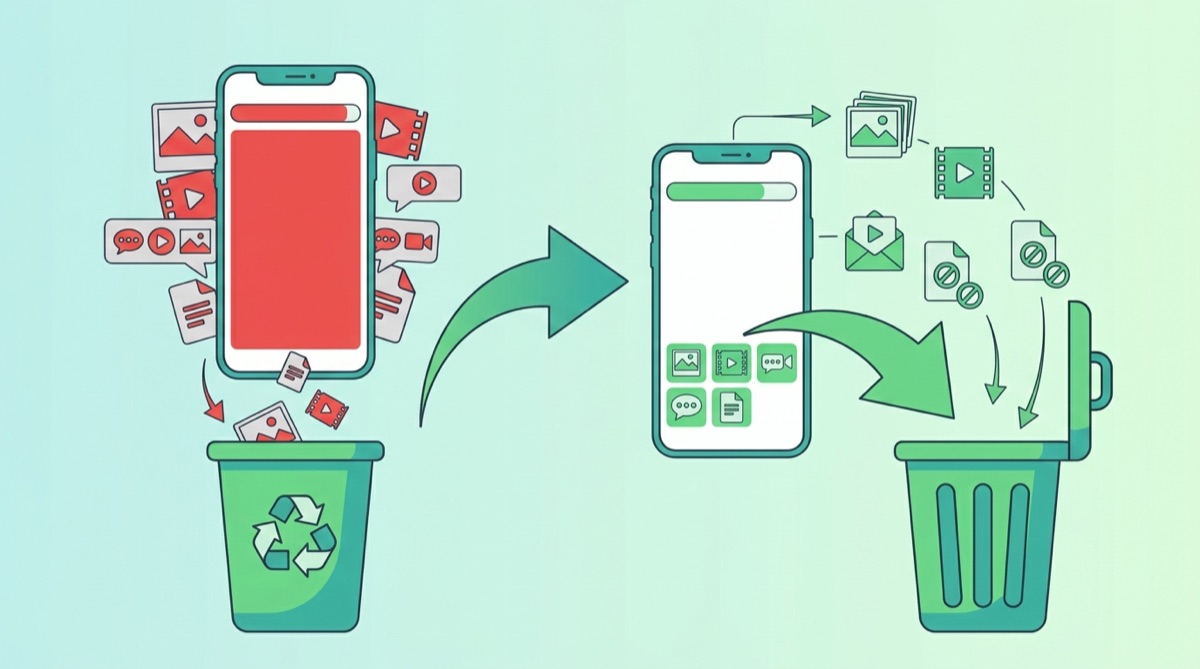
On most Brazilian cell phones, WhatsApp is the app that consumes the most storage space—often several gigabytes just from photos, videos, and audio files automatically downloaded in each group. That's why it deserves special attention:
- Use the “Manage storage” option: in Settings > Storage and data > Manage storage, WhatsApp itself shows the largest files and conversations that take up the most space.
- Delete large and resent items: The tool separates large videos and files that have been forwarded many times — prime candidates for deletion.
- Disable automatic download: Also in Storage and data, uncheck the automatic download of photos, audio, and videos on Wi-Fi and mobile data.
- Clean up conversation by conversation: In the busiest groups, use the "Clear conversation" option, keeping only the messages marked as favorites.
With just these adjustments, it's common to recover 3 to 8 GB of space in just a few minutes, without losing any important conversations.
How to free up space on your iPhone (iOS)
On the iPhone, the process is slightly different, but equally effective. Here's what to do:
- Download unused apps: in Settings > General > iPhone Storage, Enable this option. The system will remove the app, but save your data.
- Optimize photos: activate the iCloud Photos With “Optimize storage”: the original files are stored in the cloud and lightweight versions are kept on the device.
- Clear Safari: in Settings > Safari, Tap on “Clear history and data”.
- Review messages: Configure the app to automatically delete old conversations.
The best apps to clean your phone's memory.
In addition to native tools, some apps automate cleaning. The trick is to choose reliable ones and avoid fake "accelerators" that only fill the screen with ads. Safe options include:
- Files by Google: Free, lightweight, and without intrusive ads. Finds duplicate files, old memes, and caches, and suggests what to safely delete. It's the best choice for Android users.
- Google Photos: It backs up your images and frees up all the space they were taking up on your device with a single tap.
- Manufacturer's tool: Samsung (Device Care), Xiaomi (Security), and Motorola already come with a factory optimizer that is secure by default.
- Cloud apps: Google Drive, OneDrive, and Dropbox help you move documents and videos off your phone.
An important security tip: some apps that promise to "clean" your phone actually hide intrusive advertising or even threats. If your device starts acting strangely after installing one of these, check out [link to relevant safety information]. how to remove viruses from your cell phone before continuing.
Manual or app: which is more cost-effective?
Manual cleaning — deleting files and cache yourself — is the safest and most precise method because you control exactly what is removed from the device. It's the ideal option for a deep clean every now and then, without the risk of accidentally deleting something important.
A good app for cleaning up phone memory, like Files by Google, is unbeatable for day-to-day maintenance: it automates the detection of unnecessary files and saves you time. In practice, the ideal is to combine the two — use the app for quick routine cleaning and set aside a few minutes, once a month, for more detailed manual cleaning.
The cloud: the ally to never run out of space again.
If you're constantly filling up your memory, the ultimate solution is cloud storage. Instead of deleting your memories, you store them on secure servers and access them from anywhere, keeping your phone always with plenty of space to spare.
Most services offer a generous free plan, more than enough to store your favorite photos. Activate automatic backup, confirm that everything has been sent, and only then delete the copies from your device. Besides freeing up space, you protect your memories against loss, theft, or malfunction. Want to go further? Check out how to do it too. free up memory with other quick techniques.
5 habits to keep your cell phone always clean
Cleaning once solves today's problem. These habits prevent it from returning:
- Turn off Automatic media download on WhatsApp and other messaging apps;
- Back up your photos to the cloud every week and delete the local copies;
- Clear the cache of your most resource-intensive apps every 15 days;
- Review your Downloads folder once a month;
- Opt for "Lite" versions of apps that tend to be very large.
What NOT to do when clearing your phone's memory.
In the rush to free up space, many people make mistakes that make things worse. Avoid these pitfalls:
- Delete system folders: Never delete files from folders you don't recognize; this can break apps or your Android system.
- Install multiple "cleaners" at once: They fight among themselves, drain battery power, and can spread malicious advertising.
- Deleting photos without backup: Always confirm that images are saved to the cloud before deleting them from your phone.
- Believing in magical promises: No app increases the device's physical memory; be wary of anyone who claims otherwise.
How to free up RAM and stop crashes.
If your biggest problem is your phone freezing, the issue is usually with the RAM—the memory that runs open applications, unlike storage. To free it up:
- Close background apps. via the recent apps manager;
- Restart the device. Every now and then: a simple power off and on clears all the RAM;
- Reduce widgets and live wallpapers., that consume memory all the time.
Avoid "RAM boosters": Android already manages memory automatically, and constantly forcing apps to close can make everything even slower.
Common questions
Limpar o cache apaga minhas conversas do WhatsApp?
No. Clearing the cache only removes temporary files. Your conversations, saved media, and accounts remain as they were.
Com que frequência devo limpar a memória do celular?
For most people, cleaning every 15 or 30 days is sufficient. Those who use the camera a lot or download many files can do it weekly.
Vale a pena usar um aplicativo para limpar memória do celular?
Reliable apps, like Files by Google, do make it easy to find and delete unnecessary files. However, "miracle accelerators" often don't deliver real benefits and often fill your device with ads.
O cartão de memória ajuda?
On compatible Android devices, a microSD card is an inexpensive way to expand storage space for photos and videos. It's best to move only media files, not apps, to the card.
Limpar a memória melhora a bateria e o desempenho?
Yes, indirectly. With more free space and fewer applications running in the background, the system works more freely — which reduces crashes, overheating, and unnecessary battery consumption throughout the day.
É melhor limpar a memória ou resetar o celular?
Always start with cleaning, which is simple and doesn't erase anything important. A factory reset should only be considered as a last resort, when the device is very slow even after cleaning — and never without first making a complete backup of your data.
Quick summary: how to clear your phone's memory in 5 steps
- Clear the cache of the apps you use most often;
- Send photos and videos to the cloud and delete local copies;
- Uninstall the apps and games that you don't open;
- Empty the Downloads folder, the gallery trash, and WhatsApp media;
- Restart your device to free up RAM and stop the freezing.
By regularly following these five steps, your phone will rarely complain about running out of space again — and it will stay fast for much longer.
Conclusion
Cleaning up your phone's memory is simpler than it seems: start with the cache, organize photos and videos, uninstall what you don't use, and switch to the cloud. In just a few minutes, you can recover several gigabytes and restore your device's speed, without spending a penny.
Make these actions a routine and always choose a good, lightweight, and reliable app to clean your phone's memory. Do your first cleanup today and feel the difference: your phone will open apps quickly again, take photos without freezing, and function like new.